Never Miss a Finished Claude Task: Desktop Notifications for Claude Code in iTerm2
If you’ve been wanting Claude Code desktop notifications in iTerm2, you know the problem: kick off a long task, switch to your browser or Slack, and spend the next few minutes periodically alt-tabbing back to see if Claude is done. Or worse — you come back ten minutes later and Claude has been waiting on a permission prompt the whole time.
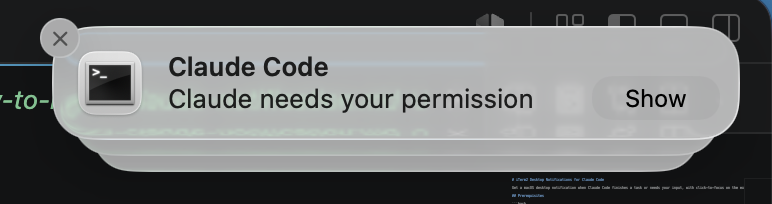
Here’s how to set up proper macOS desktop notifications that fire when Claude finishes a task or needs a permission decision — and clicking the notification jumps you straight to the right iTerm2 tab.
What You Get with Claude Code Desktop Notifications
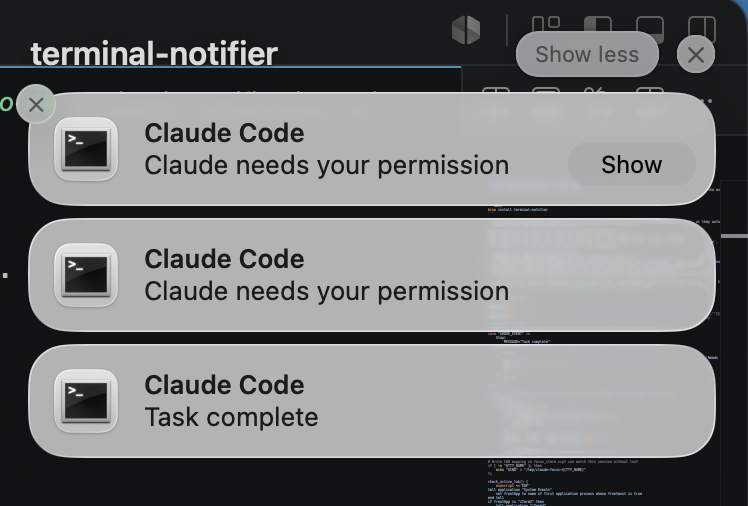
- A macOS notification when Claude Code finishes a task (fires after a 60-second delay — short tasks where you’re watching won’t spam you)
- A notification when Claude needs a permission decision (after 30 seconds)
- Smart suppression: no notification if you’re already in that iTerm2 tab
- Click-to-focus: clicking the notification brings you to the exact iTerm2 tab and session
Prerequisites
Install terminal-notifier via Homebrew:
brew install terminal-notifierThen open System Settings → Notifications → terminal-notifier and set the alert style to Alerts (not Banners — Banners auto-dismiss before you can click them).
You’ll also need to grant Automation permission in System Settings → Privacy & Security → Automation for iTerm2. This is required for both the active-tab suppression check and click-to-focus to work.
Three Files to Create
The setup is three files:
~/.claude/notify-standalone.sh— the hook script that fires on Claude events~/.claude/focus_iterm.scpt— the AppleScript that focuses the right tab when you click the notification- A hooks block to add to
~/.claude/settings.json— wires the scripts into Claude Code
The Hook Script
Create ~/.claude/notify-standalone.sh and make it executable with chmod +x ~/.claude/notify-standalone.sh:
#!/usr/bin/env bash

INPUT=$(cat)

HOOK_EVENT=$(echo "$INPUT" | python3 -c "import sys,json; d=json.load(sys.stdin); print(d.get('hook_event_name',''))" 2>/dev/null)
CWD=$(echo "$INPUT" | python3 -c "import sys,json; d=json.load(sys.stdin); print(d.get('cwd',''))" 2>/dev/null)

[ -z "$CWD" ] && exit 0

case "$HOOK_EVENT" in
    Stop)
        MESSAGE="Task complete"
        DELAY=60
        ;;
    Notification)
        MESSAGE=$(echo "$INPUT" | python3 -c "import sys,json; d=json.load(sys.stdin); print(d.get('message','Needs your input'))" 2>/dev/null)
        MESSAGE="${MESSAGE:-Needs your input}"
        DELAY=30
        ;;
    *)
        exit 0
        ;;
esac

find_tty() {
    local pid=$$
    while [ "$pid" -gt 1 ]; do
        local tty_short
        tty_short=$(ps -p "$pid" -o tty= 2>/dev/null | tr -d ' ')
        if [ -n "$tty_short" ] && [ "$tty_short" != "??" ]; then
            echo "$tty_short"
            return 0
        fi
        pid=$(ps -p "$pid" -o ppid= 2>/dev/null | tr -d ' ')
    done
    return 1
}

TTY_NAME=$(find_tty)

if [ -n "$TTY_NAME" ]; then
    echo "$CWD" > "/tmp/claude-focus-${TTY_NAME}"
fi

check_active_tab() {
    osascript <<'EOF'
tell application "System Events"
    set frontApp to name of first application process whose frontmost is true
end tell
if frontApp is "iTerm2" then
    tell application "iTerm2"
        try
            set curTTY to tty of current session of current tab of current window
            return do shell script "basename " & quoted form of curTTY
        end try
    end tell
end if
return ""
EOF
}

# Upfront check — user is already in this tab, suppress immediately
if [ -n "$TTY_NAME" ]; then
    active_tty=$(check_active_tab)
    if [ "$active_tty" = "$TTY_NAME" ]; then
        exit 0
    fi
fi

sleep "$DELAY"

# Final check — user returned to this tab during the delay
if [ -n "$TTY_NAME" ]; then
    active_tty=$(check_active_tab)
    if [ "$active_tty" = "$TTY_NAME" ]; then
        exit 0
    fi
fi

terminal-notifier \
    -title "Claude Code" \
    -message "$MESSAGE" \
    -sound default \
    -execute "osascript /Users/YOUR_USERNAME/.claude/focus_iterm.scpt '$CWD'"
Replace YOUR_USERNAME with your actual macOS username on the last line. To change the delays, edit DELAY=60 (task completion) and DELAY=30 (permission prompts).
The Focus Script
Create ~/.claude/focus_iterm.scpt:
on run argv
    set targetCWD to item 1 of argv
    tell application "iTerm2"
        repeat with aWindow in windows
            repeat with aTab in tabs of aWindow
                repeat with aSession in sessions of aTab
                    try
                        set ttyPath to tty of aSession
                        set ttyName to do shell script "basename " & quoted form of ttyPath
                        set mapFile to "/tmp/claude-focus-" & ttyName
                        set sessionCWD to do shell script "cat " & quoted form of mapFile
                        if sessionCWD is targetCWD then
                            select aWindow
                            tell aWindow to select aTab
                            tell aTab to select aSession
                            activate
                            return
                        end if
                    end try
                end repeat
            end repeat
        end repeat
    end tell
end run
When you click a notification, this AppleScript loops through all open iTerm2 windows and tabs, reads the TTY map files written by the hook script, and focuses the session whose working directory matches.
Wiring It Into Claude Code
Add this to ~/.claude/settings.json, merging with any existing hooks key. Replace YOUR_USERNAME with your macOS username:
"hooks": {
    "Stop": [{
        "hooks": [{ "type": "command", "command": "/Users/YOUR_USERNAME/.claude/notify-standalone.sh", "async": true }]
    }],
    "Notification": [{
        "matcher": "permission_prompt",
        "hooks": [{ "type": "command", "command": "/Users/YOUR_USERNAME/.claude/notify-standalone.sh", "async": true }]
    }]
}
Both hooks use "async": true so Claude Code doesn’t block while the script sleeps through the delay. The Notification hook uses "matcher": "permission_prompt" to filter out idle_prompt events — you get notified when Claude actually needs a permission decision, not every time it’s waiting for your next message.
How the Suppression Logic Works
The interesting part is the two-checkpoint suppression. Here’s the full flow for a Stop event:
- Claude finishes → hook fires
notify-standalone.shasynchronously - Script walks its process tree to find the ancestor TTY (e.g.
ttys002), inherited from the iTerm2 shell session - Writes the current working directory to
/tmp/claude-focus-ttys002 - Upfront check: Is iTerm2 frontmost and is the active tab this session’s TTY? If yes → you’re already here → exit, no notification
- Sleep for the event-specific delay (60s for Stop, 30s for permission)
- Final check: Same AppleScript check — if you returned during the delay → skip notification
- If neither check suppressed it → show the notification
- Click →
focus_iterm.scptloops all sessions, matches the CWD, and focuses the right tab
The suppression uses AppleScript rather than TTY mtime. Claude Code’s own UI (status line, cursor updates) continuously writes to the TTY, so the mtime always looks recent regardless of whether you’re actually watching — making it a misleading signal. The AppleScript active-tab check is the right approach.
Suppression Scenarios at a Glance
| Scenario | Notified? |
|---|---|
| You’re in this tab when the hook fires | No — suppressed immediately |
| You were away but returned during the delay | No — suppressed by final check |
| You were away for the full delay | Yes |
| You switched to a different iTerm2 tab | Yes — active tab TTY doesn’t match |
Gotchas
- Notification style must be Alerts, not Banners. Banners auto-dismiss before you can click them.
- Automation permission is required. Grant it in System Settings → Privacy & Security → Automation for iTerm2. Without it, the AppleScript checks fail silently.
- Click-to-focus only works after the hook has fired at least once in a given shell session — the first run creates the
/tmpmap file. A brand-new terminal session won’t have it yet. - Doesn’t work in VS Code or IntelliJ terminals. Use the Claude Code Notifications plugin for IntelliJ or the Claude Notifications extension for VS Code instead.
Debugging
If notifications aren’t behaving as expected, add a temporary log file. Right after the TTY_NAME=$(find_tty) line, add:
LOG=/tmp/claude-hook-debug.logThen sprinkle lines like echo "$(date): active=$active_tty TTY=$TTY_NAME" >> "$LOG" at key decision points. Remove the log lines once you’ve identified the issue.
Once this is all wired up, your Claude Code desktop notifications will tap you on the shoulder when Claude needs you — no more nervous tab-checking.
One thought on “Never Miss a Finished Claude Task: Desktop Notifications for Claude Code in iTerm2”